Aws-project 🚀
3-Tier Architecture PHP_Application" With GitHub Repo (Full Document)
S
Cloud & DevOps Engineer | AWS Solutions Architect | Terraform Associate | Love to work with #AWS #Terraform #Docker #Kubernetes #Jenkins #GitHub #Linux
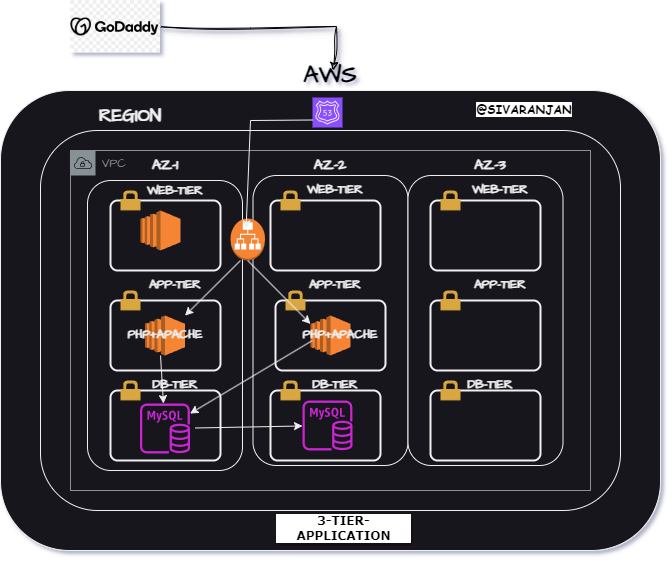
Step 1: Set Up the Web Layer (Application Load Balancer)
- 🛠️ Configure VPC: Create a Virtual Private Cloud (VPC) to host your application.
2.🌐 Launch EC2 Instances: Launch EC2 instances to serve as web servers.
3.📦 Install Web Server: SSH into your EC2 instances and install Apache or Nginx.
4.🔗 Set Up Load Balancer: Configure an Application Load Balancer (ALB) to distribute traffic.
Step 2: Set Up the Application Layer
- 🌍 Configure EC2 for PHP: Install PHP on your application servers.
2.🔄 Deploy Application Code: Deploy your PHP application code to the EC2 instances.
Step 3: Set Up the Database Layer
- 💾 Create RDS Instance: Set up a Relational Database Service (RDS) instance.
2.🗄️ Configure Database Security: Set up security groups and access controls.
Step 4: Configure Communication Between Layers
- 🔧 Configure Security Groups: Ensure proper communication between web, app, and database layers.
2.🔌 Connect App to Database: Update your PHP application to connect to the RDS database.PHP Database Connection
GITHUB-REPO : https://github.com/SivaranjanAsokan/Aws-Project-_3-Tier-PHP-App.git